SystemK🔗

SystemK is the name for the software that is at the core of KTag devices. It is a C library that implements game logic, state management, BLE and IR communication, audio, and NeoPixel animation. It runs on FreeRTOS across multiple hardware platforms (including ESP32 and PSoC 6). Each platform provides a thin set of hardware-specific drivers; everything above that layer is shared.
The source code for SystemK is available in the KTag git repos at https://git.ktag.clubk.club/Software/SystemK. This page describes SystemK version 02.03.
Architecture🔗
SystemK is organized around a central event queue and a UML-style state machine. Hardware drivers post events (KEvent_T) to the queue; the state machine task consumes them and orchestrates the subsystems in response. No subsystem calls directly into the state machine. Events are posted with Post_KEvent() from a task, or with Post_KEvent_From_ISR() from an interrupt.
A host application brings up its hardware drivers and FreeRTOS tasks, then calls Initialize_SystemK(), which:
- Creates the KEvent queue.
- Loads the settings from nonvolatile memory (
SETTINGS_Load()). - Initializes the inventory, the BLE Quiet arbiter, the BLE stack (
BLE_Init()), and the item transfer subsystem. - Creates the state machine task.
The host application is responsible for creating the NeoPixels task.
Timers🔗
SystemK does not use FreeRTOS software timers. Its timers are cooperative: they are processed on each pass of the state machine loop, so every SystemK timer callback runs on the state machine task. This means a callback can do anything the state machine can do (including blocking), and starting or stopping a timer cannot fail. The trade-off is that timer resolution is limited to the period of the state machine loop.
A periodic timer whose task was blocked for longer than one period skips the missed deadlines, rather than firing repeatedly to catch up. A timer's schedule is updated before its callback runs, so a callback that restarts or stops its own timer has the last word.
Hardware drivers outside SystemK may still use FreeRTOS timers (for example, both ESP32 BLE drivers do). Those callbacks run on the FreeRTOS timer task, and must not block.
State Machine🔗
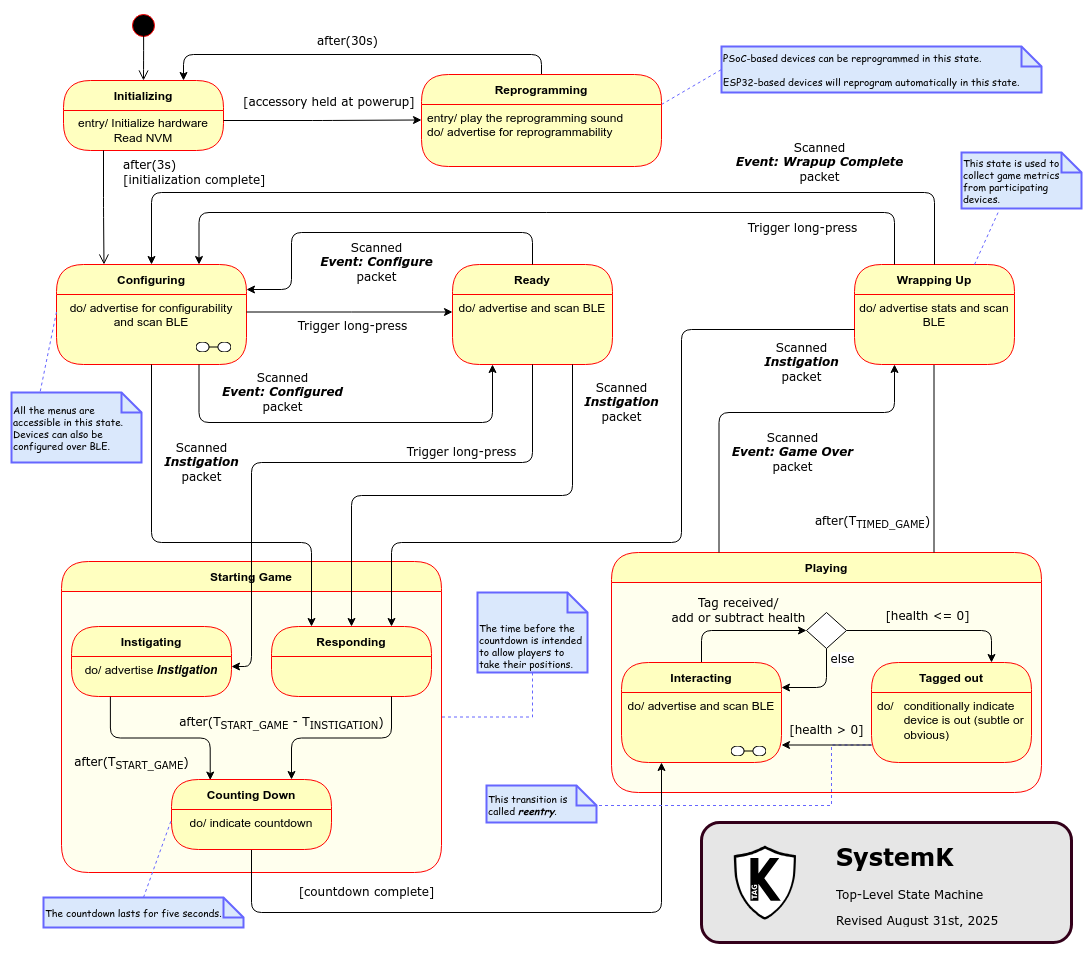
SystemK implements this Finite-State Machine in each device.
Note
The diagram above does not yet show the Consenting substate of Playing. A device enters Consenting from Interacting when another device asks it to voluntarily transfer an item (see Item Transfer). It returns to Interacting once the player accepts or declines, or the request times out.
Each state provides three callbacks: Entry (called once, on entering the state), Do (called on every pass of the loop while the state is active), and Exit (called once, before leaving the state). A state requests a transition with Transition_For_Event(), and the loop then runs the old state's Exit, followed by the new state's Entry and Do.
| State | Parent |
|---|---|
STATE_INITIALIZING |
|
STATE_REPROGRAMMING |
|
STATE_CONFIGURING |
|
STATE_READY |
|
STATE_STARTING_GAME__INSTIGATING |
Starting Game |
STATE_STARTING_GAME__RESPONDING |
Starting Game |
STATE_STARTING_GAME__COUNTING_DOWN |
Starting Game |
STATE_PLAYING__INTERACTING |
Playing |
STATE_PLAYING__TAGGED_OUT |
Playing |
STATE_PLAYING__CONSENTING |
Playing |
STATE_WRAPPING_UP |
Background BLE Advertising🔗
The state machine keeps a periodic timer that refreshes this device's BLE advertisement: a HELLO packet in Configuring, and a STATUS packet in every other state, at a rate suited to that state. Only the state machine task ever publishes an advertisement, so a packet built for one state can't go on the air after the device has moved to another.
States that manage their own advertising (such as Instigating) suspend the background advertising on entry, and resume it on exit. A splash also suspends it for one second, so that the splash stays on the air.
Subsystems🔗
| Subsystem | Purpose |
|---|---|
| Events | Static event queue used for communication between subsystems. |
| BLE | Advertising, scanning, and peer-to-peer game synchronization. |
| Transfer | Two-phase-commit transfer of inventory items (such as K-Points) between devices. |
| Protocols | Encoding and decoding of tags for a number of IR laser tag protocols. |
| Audio | Sound effects and speech. |
| NeoPixels | LED animations for one- and four-channel devices. |
| Game | Player health, shots, inventory, timing, and friendly-fire rules. |
| Settings | Persistent device configuration (team, player, volume, and so on). |
| Menu | On-device configuration user interface. |
| Timers | Cooperative timers processed by the state machine task. |
| Logging | Debug output (KLOG_ERROR(), KLOG_WARN(), KLOG_INFO(), and so on). |
IR Protocols🔗
SystemK can send and receive tags using these protocols:
Dubuque · Dynasty · Laser X · Miles Tag II · NEC · Nerf Laser Ops Pro · Nerf Laser Strike · Nerf Phoenix LTX · Squad Hero · Test
Each protocol implements encoding (tag to IR pulse train), decoding (IR pulse train to tag), and a mapping between team IDs and colors.
Shots and Tags🔗
When the countdown begins, SystemK builds this device's tag and has the IR hardware encode it once (Prepare_Tag()). That prepared tag is then reused for every shot in the game.
When the trigger is pressed, SystemK fires the prepared tag, unless the device fired too recently or is out of shots. After each shot, the device waits at least T_Minimum_Time_Between_Shots_in_ms (or the hardware's own minimum, if that is longer) before it can fire again. For protocols other than Dubuque, a small random delay is added, so that two players who fire at each other at exactly the same moment don't keep colliding. Holding the trigger down fires automatically while the player has shots left. When the player is out of shots, holding the trigger reloads. Nothing is fired when the trigger is released.
When a tag is received, SystemK first checks whether the sender's team can tag this player. If it can't, the device plays the friendly-fire sound and ignores the tag. Shortly after firing a Purple tag, a device ignores incoming tags that might be reflections of its own shot. A valid tag reduces the player's health, and a player whose health reaches zero is tagged out.
Accessory Weapons and Splashes🔗
The accessory switch fires a special weapon, chosen by the Accessory_Mode setting:
Accessory_Mode |
Weapon | Effect |
|---|---|---|
| 0 | (off) | The accessory switch does nothing while playing. |
| 1 | BLE Bomb | The device sends a splash: a broadcast BLE TAG packet that deals Splash_Damage to nearby devices. |
| 2 | Bunker Buster | The device fires a White Dubuque IR tag. This doesn't count as a shot, and isn't held off by shots. A device set up for the Bunker Buster that is hit by one sends its own splash, and then takes Bunker_Buster_Direct_Damage. Because the splash goes out first, it is sent even if the hit tags the device out. |
Either weapon uses up one of the special weapons the player gets on reentry (N_Special_Weapons_On_Reentry). Both weapons share a cooldown (T_Special_Weapon_Cooldown_in_ms), and a weapon that can't be used plays a "bonk". The Bunker Buster also needs the IR hardware to implement Prepare_Special_Tag(). A Dubuque tag can't say who fired it, so a White tag hits every device, including the device that fired it. To avoid tagging itself, the shooter ignores White tags for a short time after firing one.
The originating device's Splash_Target_Teams, Splash_Min_RSSI, and Splash_Hops settings determine which devices a splash affects. These values are carried in bytes of the TAG packet that were previously unused:
| Byte | Field | Meaning | 0xFF (legacy TAG packet) |
|---|---|---|---|
| 26 | splash_target_teams |
0 = all teams, 1 = originating team only, 2 = all except the originating team | No team filter |
| 27 | splash_min_rssi |
Receivers ignore the TAG below this RSSI (in dBm) | -75 dBm |
| 28 | hops_remaining |
Number of times the TAG may still be relayed | Not relayed |
| 29–30 | splash_ID |
uint16_t, little-endian; identifies the TAG across all of its relays |
0xFFFF: none |
A device acts on any one TAG at most once, however many relays it hears. A device in any Playing substate relays a TAG that has hops remaining, whether or not the TAG affected it. The relayed copy is identical except that hops_remaining is one less. This applies to every TAG, including a Medic's targeted heal. As a result, a TAG can reach devices beyond its sender's range, and the team filter is always relative to the device that originated it. Hops are limited to 5, and a received TAG never starts a new splash, so splashes can't set off chain reactions.
Item Transfer🔗
SystemK implements the BLE TRANSFER packet, a two-phase-commit protocol used to move inventory items (such as K-Points) between devices. Only one transaction is active at a time. Involuntary requests are handled automatically; voluntary requests put the device into the Consenting state to wait for the player's decision. Each step is retried on timeout, and a transaction that runs out of retries is aborted. The protocol intentionally prefers the accidental loss of an item over counting an item twice.
Configuration🔗
These options are set in Kconfig (on ESP-IDF) or by the host application's build.
| Configuration Option Name | Default Value | Description |
|---|---|---|
CONFIG_KTAG_N_NEOPIXEL_CHANNELS |
4 | Number of NeoPixel channels supported by this hardware. Only 1 and 4 are supported. |
CONFIG_KTAG_MAX_NEOPIXELS_PER_CHANNEL |
8 | Maximum number of NeoPixels on a single channel. |
CONFIG_KTAG_ANIMATION_STEP_TIME_IN_ms |
10 | Time between animation updates, in milliseconds. |
CONFIG_KTAG_T_DEFAULT_START_GAME_in_ms |
30000 | Default time (in milliseconds) after starting a game before the countdown begins. |
CONFIG_KTAG_MAX_AUDIO_VOLUME |
100 | Value of audio volume representing the maximum volume possible for this device (1 to 100). |
CONFIG_KTAG_MIN_AUDIO_VOLUME |
0 | Value of audio volume representing the minimum volume possible for this device (0 to 99). |
CONFIG_SYSTEMK_LOG_LEVEL |
Verbose | Maximum compiled log level: None, Error, Warning, Info, Debug, or Verbose. Messages above this level are removed at compile time. |
Hardware Support Functions🔗
In addition to the above configuration options, the hardware abstraction layer for a KTag device is required to implement the functions declared in these SystemK headers:
| Header | Area |
|---|---|
Settings_Interface.h |
Settings |
IR_HW_Interface.h |
Infrared |
Audio_HW_Interface.h |
Audio |
BLE_HW_Interface.h |
Bluetooth® Low Energy1 |
NeoPixel_HW_Interface.h |
NeoPixels |
Console_HW_Interface.h |
Logging/Console |
Unless otherwise noted, all of these functions return a SystemKResult_T, where SYSTEMK_RESULT_SUCCESS (0) indicates success and all other values indicate a specific failure. See Results.h for the full list.
Settings🔗
Each setting has its own typed getter and setter, named after the setting's key:
SystemKResult_T SETTINGS_get_<Key>(<type> * value)SystemKResult_T SETTINGS_set_<Key>(<type> value)
For example, SETTINGS_get_Team_ID(uint8_t * value) and SETTINGS_set_T_Game_Length_in_ms(uint32_t value).
The settings are defined in Settings/Settings.csv, and the declarations (and an implementation with a cache and asynchronous save) are generated from it by Settings/generate_settings_code.py.
| Setting ID | Key | Datatype | Default | Description |
|---|---|---|---|---|
SYSTEMK_SETTING_IS_RIGHT_HANDED |
Is_Right_Handed |
uint8_t | 1 | 1 if this device is configured for a right-handed player, 0 otherwise. |
SYSTEMK_SETTING_AUDIO_VOLUME |
Audio_Volume |
uint8_t | CONFIG_KTAG_MAX_AUDIO_VOLUME |
Value from CONFIG_KTAG_MIN_AUDIO_VOLUME to CONFIG_KTAG_MAX_AUDIO_VOLUME representing the current volume. |
SYSTEMK_SETTING_TEAMID |
Team_ID |
uint8_t | BASIC_TEAMS_MINIMUM |
Selected team. |
SYSTEMK_SETTING_PLAYERID |
Player_ID |
uint8_t | 0 | Unique-per-team identification of a player. |
SYSTEMK_SETTING_WEAPONID |
Weapon_ID |
uint8_t | DUBUQUE_PROTOCOL_ID |
Selected weapon. |
SYSTEMK_SETTING_MAX_HEALTH |
Max_Health |
uint8_t | 30 | Maximum health for the game. |
SYSTEMK_SETTING_SHOT_CAPACITY |
Shot_Capacity |
uint8_t | 30 | Number of shots a player acquires when reloading. |
SYSTEMK_SETTING_RELOAD_ON_REENTRY |
Reload_On_Reentry |
uint8_t | 1 | 1 if the device reloads when reentering after being tagged out, 0 otherwise. |
SYSTEMK_SETTING_T_MINIMUM_TIME_BETWEEN_SHOTS_in_ms |
T_Minimum_Time_Between_Shots_in_ms |
uint32_t | 250 | Minimum time (in milliseconds) between shots. If this is less than the device's minimum allowed time between shots, the device will use its minimum allowed time. |
SYSTEMK_SETTING_N_SPECIAL_WEAPONS_ON_REENTRY |
N_Special_Weapons_On_Reentry |
uint8_t | 1 | Number of special weapons (the accessory weapon: BLE Bomb or Bunker Buster) obtained when reentering after being tagged out. |
SYSTEMK_SETTING_T_START_GAME_in_ms |
T_Start_Game_in_ms |
uint32_t | 30000 | Time (in milliseconds) after starting a game before the countdown begins. |
SYSTEMK_SETTING_T_GAME_LENGTH_in_ms |
T_Game_Length_in_ms |
uint32_t | 600000 | Duration of a game (in milliseconds). If this is zero or UINT32_MAX, the game is untimed. |
SYSTEMK_SETTING_SECONDARY_COLOR |
Secondary_Color |
uint32_t | 0xFE000000 |
Color in addition to the team color used to identify a player's device. The format is Brightness-Red-Green-Blue, where a brightness of 0xFF indicates a false flag. |
SYSTEMK_SETTING_MIN_RSSI_TO_INITIATE_TRANSFER |
Min_RSSI_To_Initiate_Transfer |
int8_t | -50 | Minimum RSSI (in dBm) required to start a BLE item transfer. Packets below this threshold are ignored while no transfer is in progress. |
SYSTEMK_SETTING_NEC_COMMAND |
NEC_Command |
uint32_t | 0 | 32-bit NEC command (in decimal) sent by the NEC Command weapon. |
SYSTEMK_SETTING_ACCESSORY_MODE |
Accessory_Mode |
uint8_t | 1 | Action of the accessory switch while playing: 0 = Off, 1 = BLE Bomb, 2 = Bunker Buster. |
SYSTEMK_SETTING_BUNKER_BUSTER_DIRECT_DAMAGE |
Bunker_Buster_Direct_Damage |
uint8_t | 100 | Damage taken by a device hit by a Bunker Buster (White Dubuque) IR tag, after it sends its splash. |
SYSTEMK_SETTING_SPLASH_DAMAGE |
Splash_Damage |
uint8_t | 100 | Damage dealt by a splash (BLE Bomb or Bunker Buster) BLE tag. |
SYSTEMK_SETTING_SPLASH_MIN_RSSI |
Splash_Min_RSSI |
int8_t | -75 | Minimum RSSI (in dBm) at which a device is affected by (and relays) a splash that this device originates. |
SYSTEMK_SETTING_SPLASH_TARGET_TEAMS |
Splash_Target_Teams |
uint8_t | 0 | Which devices a splash that this device originates affects: 0 = all, 1 = the originating device's team only, 2 = all except the originating device's team. |
SYSTEMK_SETTING_T_SPECIAL_WEAPON_COOLDOWN_in_ms |
T_Special_Weapon_Cooldown_in_ms |
uint32_t | 1000 | Minimum time (in milliseconds) between uses of the accessory weapon. Zero means no cooldown. |
SYSTEMK_SETTING_SPLASH_HOPS |
Splash_Hops |
uint8_t | 0 | Number of times a splash that this device originates is relayed by devices that hear it (0 to 5). Zero means no relaying. |
In addition to the generated functions:
SystemKResult_T SETTINGS_Load(void)
Called byInitialize_SystemK()to read the settings from nonvolatile memory.SystemKResult_T SETTINGS_Save(void)
Called by the system when the settings should be saved to nonvolatile memory.SystemKResult_T SETTINGS_get_Device_Type(uint32_t * value)
Gets the (read-only) type of this device, which is reported over BLE.SystemKResult_T SETTINGS_get_device_name(char * name, size_t max_len)SystemKResult_T SETTINGS_set_device_name(char * name)
Gets or sets the name of this device, which is at mostSYSTEMK_MAX_CHARS_IN_DEVICE_NAME(16) characters.
Infrared Support🔗
PreparedTag_T * Prepare_Tag(const TagPacket_T * packet)
Encodes a tag packet into a form ready to be sent by the IR hardware. This is called once, at the start of the countdown, and the result is reused for every shot during the game.PreparedTag_T * Prepare_Special_Tag(const TagPacket_T * packet)
LikePrepare_Tag(), but uses separate storage, so that both prepared tags stay valid. The Bunker Buster uses this to prepare its White tag alongside the regular shot. This one is optional. SystemK provides a weak default that returnsNULL, which means the Bunker Buster isn't available on that device.SystemKResult_T Send_Tag(PreparedTag_T * tag)
Sends a prepared tag out the barrel. The driver should postKEVENT_TAG_SENT, with the tag that was sent as the event data, once the transmission is complete.
Audio Support🔗
SystemKResult_T Perform_Audio_Action(AudioAction_T * action)
Called by the system when it needs to interact with the audio subsystem. TheAudioAction_Tnames one of the actions inAudioActionID_T(set the volume, silence, play a sound, pronounce a number, and so on). IfPlay_To_Completionistrue, the driver should play the whole sound before handling the next action, and then postKEVENT_AUDIO_COMPLETED(with the action ID as the event data).
The online tool jsfxr is helpful if you'd like to make your own sounds.
Bluetooth® Low Energy Support🔗
SystemKResult_T BLE_Init(void)
Initializes the BLE stack. Called byInitialize_SystemK(), before any other BLE function.SystemKResult_T BLE_GetMyAddress(uint8_t BD_ADDR[BD_ADDR_SIZE])
Gets the BD_ADDR (six-byte unique identifier used by BLE) of this device. Only public addresses are supported; if there isn't one, this returnsSYSTEMK_RESULT_NOT_IMPLEMENTED.SystemKResult_T BLE_SetAdvertisingData(BLE_AdvertisingData_T * data)
Called by the system when it needs to change the advertising data. The implementation must copy the data before returning. If advertising is active, it should be restarted so that the new data takes effect immediately.SystemKResult_T BLE_ScanAndAdvertise(void)
Called to begin scanning and advertising. If the device is currently quiet, advertising begins whenBLE_Unquiet()is called.SystemKResult_T BLE_StopAdvertising(void)
Called when the system needs to stop sending BLE advertisements.SystemKResult_T BLE_StopScanning(void)
Called by the system when it no longer needs to listen for BLE advertisements.SystemKResult_T BLE_Quiet(uint32_t duration_ms)
Called when the system has been instructed to only speak when spoken to. The device should cease BLE advertisements for the duration, or until an “Unquiet” is received. Aduration_msof 0 means an indefinite Quiet. Calling this while already quiet replaces the remaining duration with the new one (and aduration_msof 0 makes the Quiet indefinite).SystemKResult_T BLE_Unquiet(void)
Called by the system to resume sending BLE advertisements, effectively ending a Quiet. Advertising resumes only if it was active when the Quiet began.
BLE_ScanAndAdvertise(), BLE_StopAdvertising(), BLE_StopScanning(), BLE_Quiet(), and BLE_Unquiet() should all be idempotent, and should return SYSTEMK_RESULT_NOT_READY if the BLE stack is not ready yet.
NeoPixel Support🔗
On devices with four NeoPixel channels, the channels (NeoPixelsChannel_T) are NEOPIXEL_CHANNEL_BARREL, NEOPIXEL_CHANNEL_RECEIVER, NEOPIXEL_CHANNEL_DISPLAY, and NEOPIXEL_CHANNEL_EFFECTS. On devices with a single channel, all four names refer to that channel.
SystemKResult_T HW_NeoPixels_Init(void)
Called when the NeoPixels task starts, before the animations begin. The NVM will have been initialized and the configurations read by this time, so the HAL can know the RGB order, for example.SystemKResult_T HW_NeoPixels_Set_Color(NeoPixelsChannel_T channel, uint8_t position, color_t color)
Called by the various animations to change the color of a pixel in the back buffer. Acolor_tis auint32_twith the format Brightness-Red-Green-Blue (seeColors.h).SystemKResult_T HW_NeoPixels_Publish(void)
Called at the end of each animation frame, to send the pixel colors out to the NeoPixels.
Logging/Console Support🔗
SystemKResult_T HW_Execute_Console_Command(const char * const command)
Executes a console command programmatically. For example, SystemK calls this with"reprogram"from the Reprogramming state.
Tests🔗
SystemK has a host-based test suite in its Tests/ directory. It uses Unity and runs on a Linux PC, so no embedded hardware is needed. FreeRTOS is replaced by lightweight stubs, and the hardware interfaces are replaced by mocks that record each call. Cooperative timers take the current time as an input, so the tests set the time themselves and don't need any real delays.
cd Tests
cmake -B build -S .
cmake --build build
./build/SystemK_Tests
Filesystem🔗
For information on the files that are (or should be) on the USB stick used by some SystemK-based devices, see this page.
References🔗
- LED Strip Driver component in the ESP Component Registry.
- NeoPixel Driver using Direct Memory Access by Alan Hawse of Elkhorn Creek.
- GitHub repo of the above.
-
Bluetooth® Low Energy is a registered trademark of Bluetooth SIG, Inc. All trade names, trademarks, and registered trademarks mentioned in this documentation are the property of their respective owners, and are hereby acknowledged. ↩